![Husl_logo_strapline-TM (4).png]](https://help.unwritten.hair/hs-fs/hubfs/Husl_logo_strapline-TM%20(4).png?height=40&name=Husl_logo_strapline-TM%20(4).png)
How to Delete Your HUSL Account
Follow these simple steps:
-
Open the HUSL app.
-
Tap your Profile icon.
-
Scroll to the bottom of the page.
-
Tap “Delete My Account”.
-
Confirm your decision.
Once confirmed, your account will be permanently deleted.
💡 Tip: Make sure you’ve saved any important information before deleting your account, as this action cannot be undone.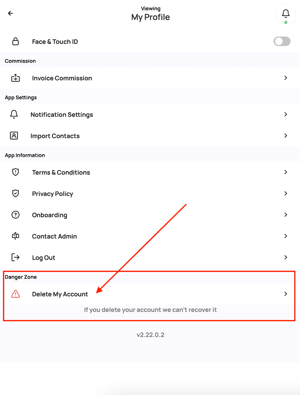
We’d Love Your Feedback
If HUSL didn’t work for you, we’d genuinely love to know why.
Feedback from users who choose to leave is incredibly valuable and helps us improve the platform for everyone. We take all feedback seriously and use it to guide updates and improvements.
If you’re open to sharing, please let us know what could have been better — we truly appreciate it.
Please email: indiesupport@husl.io