![Husl_logo_strapline-TM (4).png]](https://help.unwritten.hair/hs-fs/hubfs/Husl_logo_strapline-TM%20(4).png?height=40&name=Husl_logo_strapline-TM%20(4).png)
Yes, you can easily create and add a service policy for your online bookings directly within the HUSL app.
A service policy helps set clear expectations with clients before they book, helping reduce issues around cancellations, deposits, late arrivals, no-shows, refunds, and appointment changes. It also gives your business a more professional and organised booking experience.
How to Add a Service Policy in HUSL
Follow these steps:
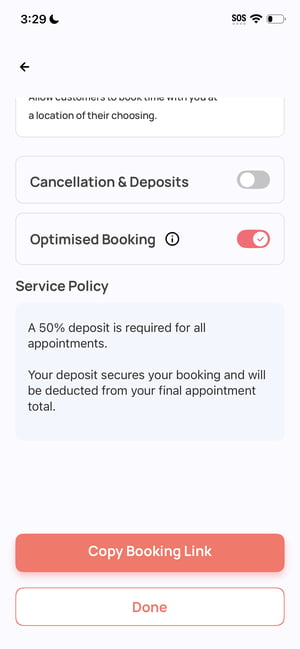
- From the HUSL home screen, tap your profile image in the top left corner.
- Tap Booking Set Up.
- Scroll down to the Service Policy section.
- Enter your service policy.
- Save your changes.
What Clients See
When a client taps your online booking link, your service policy will appear on the very first booking page.
Clients must tap the Confirm button at the bottom of the policy before they can continue selecting services and booking an appointment.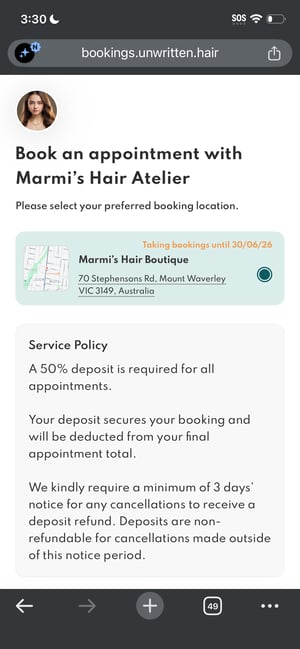
💡 Tips for a Good Service Policy
Keep your policy:
- Clear and easy to understand
- Short and professional
- Focused on important booking terms such as:
- Deposits
- Cancellation notice periods
- Late arrivals
- No-shows
- Refund policies
A clear service policy can help minimise misunderstandings and protect your time as a stylist or barber.
Need help? Email indiesupport@husl.io