![Husl_logo_strapline-TM (4).png]](https://help.unwritten.hair/hs-fs/hubfs/Husl_logo_strapline-TM%20(4).png?height=40&name=Husl_logo_strapline-TM%20(4).png)
Yes, you can add images directly to client notes in the HUSL app, and client notes are unlimited.
This makes it easy to store visual references such as colour formulas, consultation images, inspiration photos, and client transformation progress without any restriction.
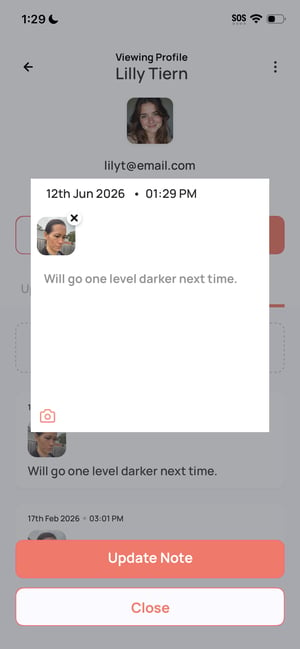
How to Add Images to Client Notes- From your Home Screen, tap the bottom middle button to open your client list
- Select the client you want
- Tap into their profile
- Tap Notes
- Select Add Note
- In the Notes field, tap the camera icon (bottom left)
- Choose one of the following:
- Select an image from your photo gallery
- Take a new photo using your camera
- Once added, tap Save Note
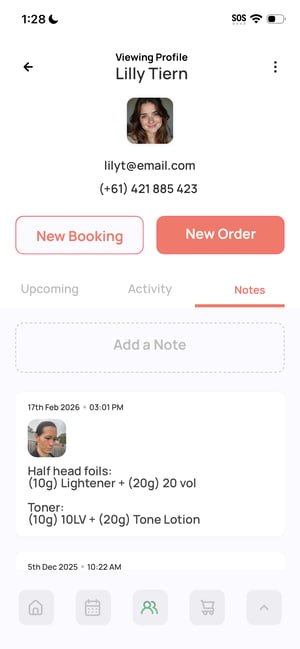
Unlimited client notes with images help you:
- Keep ongoing visual client records
- Store colour formulas and inspiration images
- Track transformations over time
- Improve consultation accuracy
- Build a complete client history with no limits
- Add before/after photos to track long-term results
- Save colour formulas alongside images for quick access
- Use notes during consultations to show previous work
- Keep images clear and well-lit for best reference value
- Use notes freely — there is no limit on booking or client notes in HUSL
Yes - in HUSL you can add images to unlimited client notes by using the camera icon inside each client profile. This helps you build a complete, visual client history with no restrictions.
Need help? email: indiesupport@husl.io