![Husl_logo_strapline-TM (4).png]](https://help.unwritten.hair/hs-fs/hubfs/Husl_logo_strapline-TM%20(4).png?height=40&name=Husl_logo_strapline-TM%20(4).png)
Once you’ve finished a sale in HUSL, you can instantly rebook the same client without needing to go back to your calendar or search for their profile.
Make sure you're on the latest app version.
This helps you:
- Save time at checkout
- Secure repeat bookings on the spot
- Keep your calendar consistently filled
- Improve client retention
- Complete the client’s checkout/sale as normal
- Once the transaction is finished, tap Rebook Client
- Select Yes if you want to rebook the same service
- Choose the date and time
- Confirm the booking
That’s it - the appointment is instantly added to your calendar.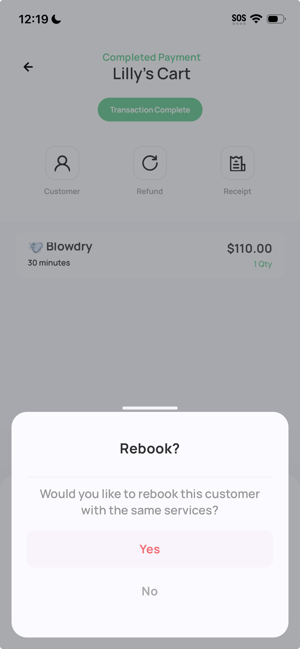
Rebooking immediately after checkout means:
- No switching between screens
- No searching for client details
- Faster in-salon workflow
- Higher chance of securing the next appointment before the client leaves
- Rebook while the client is still in the chair to increase commitment
- Suggest their next appointment based on your service cycle (e.g. 6–8 weeks)
- Combine with retail recommendations before checkout for higher value visits
- Use it consistently to build a fully booked calendar in advance
The Rebook feature allows you to instantly schedule your client’s next appointment right after checkout, helping you save time and increase repeat bookings.
Need help? email: indiesupport@husl.io