![Husl_logo_strapline-TM (4).png]](https://help.unwritten.hair/hs-fs/hubfs/Husl_logo_strapline-TM%20(4).png?height=40&name=Husl_logo_strapline-TM%20(4).png)
You might be wondering when your customers receive their appointment reminder emails or SMS messages.
Appointment reminders are fully customisable. You can choose whether reminders are sent by email, SMS, or both, and you can also select when they’re sent — 24, 48, or 72 hours before the appointment start time.
This flexibility allows you to manage no-shows, cancellations, and reschedules in a way that best suits your business.
Appointment reminder options
You can customise both the delivery method and timing of appointment reminders:
Reminder delivery
-
Email reminders
-
SMS reminders
-
Email + SMS reminders
📌 Clients will only receive:
-
Email reminders if an email address is saved in their profile
-
SMS reminders if a valid mobile number is saved and SMS reminders are turned on
Reminder timing
Choose when reminders are sent:
-
24 hours before the appointment
-
48 hours before the appointment
-
72 hours before the appointment
SMS pricing
If you choose to send appointment reminders via SMS:
-
Each SMS reminder costs 9c per message
-
SMS credits are prepaid
How SMS credits work:
-
A $10 credit pack is charged upfront
-
When your balance drops below $1, an automatic $10 top-up is applied
-
This ensures reminders continue sending without interruption
How to set up appointment reminders
Follow these steps to configure your reminder preferences:
-
From the Home screen, tap your profile image in the top-left corner
-
Select Client Notifications
-
Choose your reminder type:
-
Email
-
SMS
-
Email + SMS
-
-
Select when reminders should be sent:
-
24h, 48h, or 72h before the appointment
-
-
Tap Save
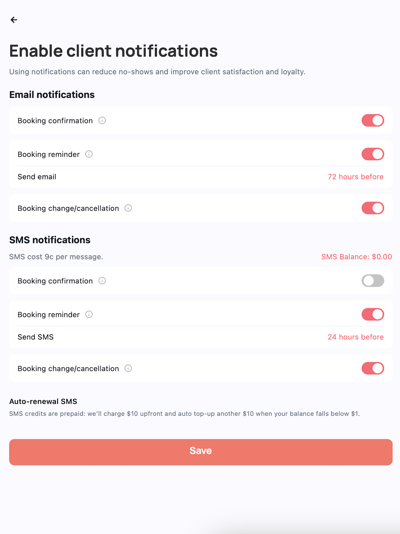
✅ All future appointments will follow your selected reminder settings.
💡 Tips
-
72 hours gives you more time to refill cancelled appointments
-
24 or 48 hours can help reduce last-minute no-shows
-
Using both email and SMS increases reminder visibility
-
Keep client contact details up to date to ensure reminders are delivered
Need help? Email: indiesupport@husl.io